

BOX - Avoid Losing Access
Best Practice: Use a Department Account as the Folder Owner
Work-related Box folders should be owned by a department account, not an individual employee or student.
When a person leaves Baylor, the Box folders they own become inaccessible; all collaborators, including Co-Owners, will lose access.
When creating work folders, or if you work in a folder owned by an individual:
Ask the owner to transfer ownership to a departmental account.
If you've already lost access:
Contact the Help Desk and provide: * Folder owner name; * Folder name; * Key file names
Create/Transfer Folder Ownership to a Department Account
- Current Owner creates/opens the Box folder
- Ensure there is at least one Co-Owner assigned
- Add the department account as a collaborator with Editor permissions
- Manage Collaborators to transfer folder ownership to the departmental account
* This makes the previous owner an Editor; a Co-Owner may make you Co-Owner, if needed
* Co-Owners may do everything an Owner can, except transfer ownership or delete the folder
Don' see your departmental Box account?
Submit a request through the Baylor Help Desk.
(examples: Chemistry_Box, Statistics_Box, Political_Science_Box).
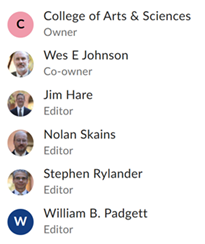
Example:
A&S Technology folders are owned by a resource account rather than individual users.
Related Resources
See the Box FAQ (toward the page end) for instructions on transferring personal Box content before departing Baylor.
Arts & Sciences Technology
Created 06-15-22 due to increasing confusion when folks leave
Updated 11-17-26; if not clear, tell us why at astc@baylor.edu